
API actions require technical understanding of setting up servers or interfaces.
Please note that this tutorial is only available in English, as it is primarily aimed at users with a more technical background, for whom English is the de facto standard.
API actions allow you to connect external systems and services to your workflows by making HTTP requests to their endpoints. They enable you to send data to or retrieve data from third-party applications, databases, or custom servers programmatically. You can configure the request method (GET, PATCH, POST, PUT, DELETE), headers, authentication, and body parameters to match the API's requirements. API actions are particularly useful when MCP integration is not available or when you need direct control over the HTTP communication. Once configured, these actions can be triggered automatically within your workflows or by AI Agents to automate tasks and synchronize data across platforms.
Disclaimer! The quality of your data really matters! If you provide the AI with low-quality information, you'll get low-quality results back (think "garbage in, garbage out")
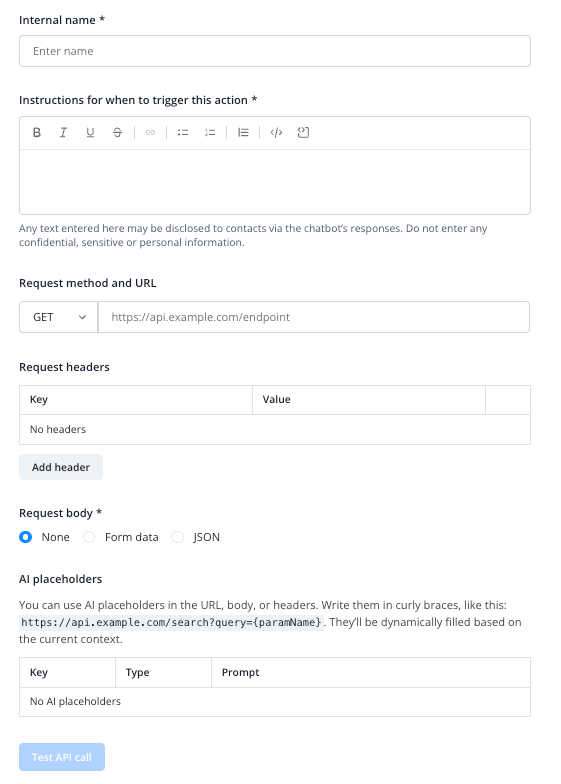
Give your API action an internal name and provide instructions for your AI Agent on when to trigger this action.
Add the designated endpoint URL and method.
Configure headers, body and placeholders if needed.
Keep in mind that you have to activate your new API action for every AI Agent you want to have access to it in the system Actions tab of your AI Agent setup page.
Example configurations
(open toggle points with the arrow on the left)