
API actions require technical understanding of setting up servers or interfaces.
Please note that this tutorial is only available in English, as it is primarily aimed at users with a more technical background, for whom English is the de facto standard.
API actions allow you to connect external systems and services to your workflows by making HTTP requests to their endpoints. They enable you to send data to or retrieve data from third-party applications, databases, or custom servers programmatically. You can configure the request method (GET, PATCH, POST, PUT, DELETE), headers, authentication, and body parameters to match the API's requirements. API actions are particularly useful when MCP integration is not available or when you need direct control over the HTTP communication. Once configured, these actions can be triggered automatically within your workflows or by AI Agents to automate tasks and synchronize data across platforms.
Disclaimer!
The quality of your data really matters! If you provide the AI with low-quality information, you'll get low-quality results back (think "garbage in, garbage out")
Every AI model works with context limits, which means there's a limitation on the amount of data that can be provided to it from external systems, for example via API or through an MCP server.
To achieve the best possible answer quality, it is essential to pre-filter the information as much as possible. The goal is for the AI model to receive exclusively the exact information needed to answer this one specific message.
Otherwise, the AI model gets "overloaded" with unfiltered information, and thus an unnecessarily large amount of data, in the hope that the AI will generate a meaningful answer from it, and ideally do so lightning-fast. This is not realistic.
Therefore, make the best possible use of parameter passing options, both based on the contact's inputs and when returning data via API.
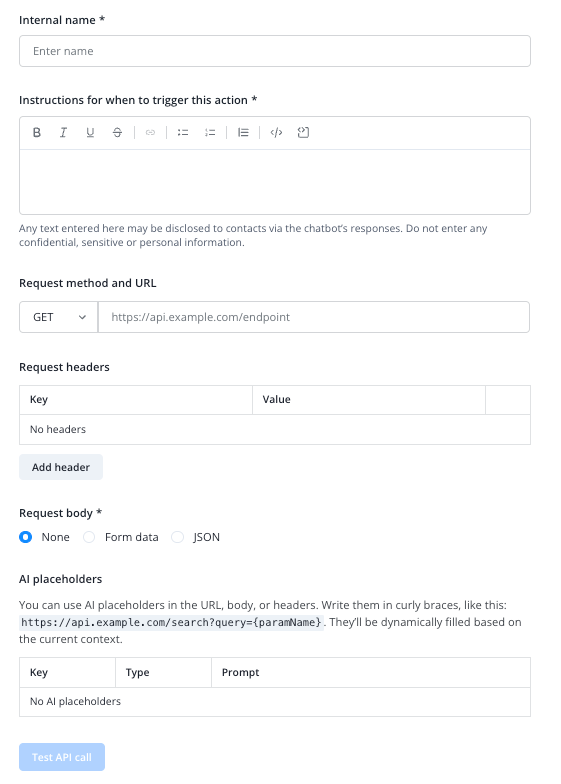
Give your API action an internal name and provide instructions for your AI Agent on when to trigger this action.
Add the designated endpoint URL and method.
Configure headers, body and placeholders if needed.
Keep in mind that you have to activate your new API action for every AI Agent you want to have access to it in the system Actions tab of your AI Agent setup page.
Example configurations
 Example configurations
Best practices
best possible reduction of data passed to Lime Connect via API Actions
Every AI model has technically imposed context limits. This means there is a limit to the maximum amount of data/information the model can process in a single request.
Even if context limits may seem to allow a lot of information in theory, in practice the quality of the answers often decreases significantly as the amount of data increases.
To achieve the best possible answer quality, it is therefore essential to pre-filter the information as much as possible. The goal is for the AI model to receive only exactly the information it needs to answer that one specific question.
If such filtering is not performed, the AI model is “drowned” in an unnecessarily large amount of data, which—as mentioned—significantly reduces the quality of the answers.
For API actions inside Connect AI or API nodes inside Workflows, you can, if needed, identify that the calls come from Lime Connect by adding a custom header inside the API call configurations. This will enable you to e.g. white-list them. Please note that we don’t provide a user agent for this.